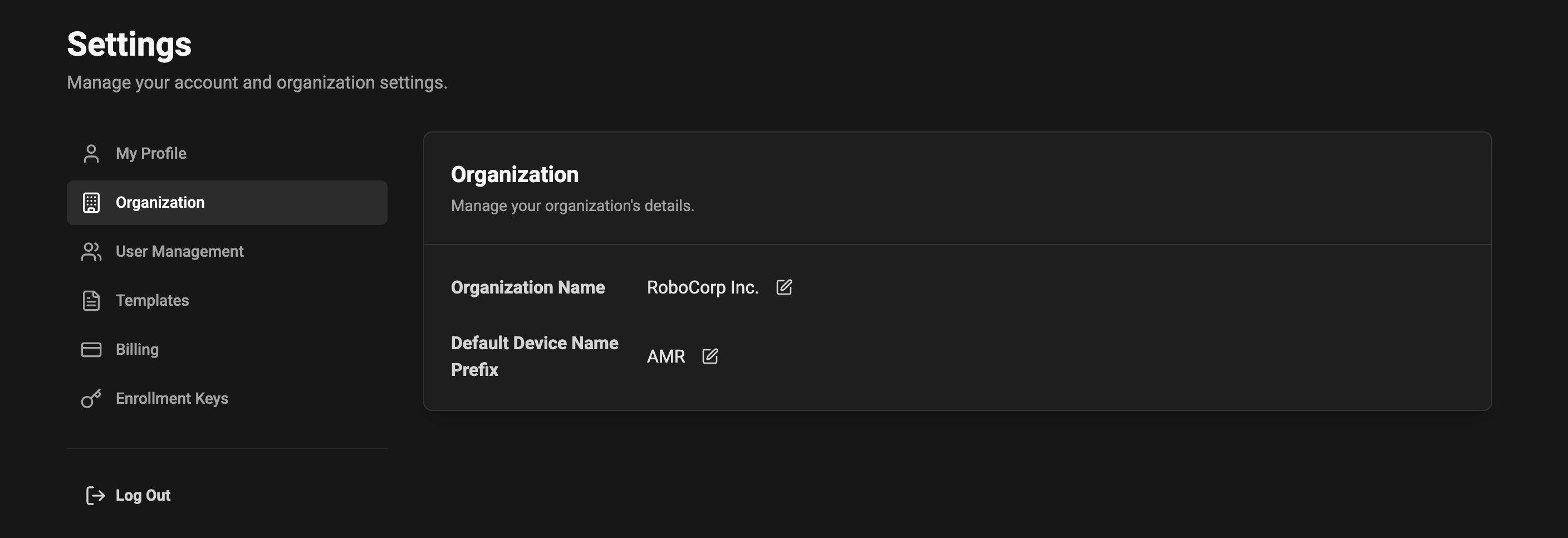
 ### Organization name
* The organization name is the canonical name shown in the app headers and in generated communication.
Editing the Organization Name
* Click the edit icon next to the organization name to change it.
* Changes are saved immediately and will appear across the application where the organization name is displayed.
### Device name prefix (automatic numbering)
You can provide a default prefix that will be used when new devices are registered. This helps keep device names consistent and easy to identify.
* Example: If you set the prefix to `AMR`, devices will be named automatically as `AMR 1`, `AMR 2`, `AMR 3`, etc., in the order they are registered.
* If no prefix is set, the system will use the generic prefix `Device`, producing names like `Device 1`, `Device 2`, and so on.
* The numbering is incremental and applied automatically when a device is created. The system ensures uniqueness by incrementing the next available number for that prefix.
Behavior and edge cases
* Empty or whitespace-only prefixes are treated as "not set" and fall back to `Device`.
* Prefixes may include letters, numbers, and hyphens (`-`). Spaces are trimmed. Leading/trailing spaces will be removed.
* If you change the prefix later, existing device names are NOT renamed automatically. The new prefix will only apply to devices created after the change.
### Organization name
* The organization name is the canonical name shown in the app headers and in generated communication.
Editing the Organization Name
* Click the edit icon next to the organization name to change it.
* Changes are saved immediately and will appear across the application where the organization name is displayed.
### Device name prefix (automatic numbering)
You can provide a default prefix that will be used when new devices are registered. This helps keep device names consistent and easy to identify.
* Example: If you set the prefix to `AMR`, devices will be named automatically as `AMR 1`, `AMR 2`, `AMR 3`, etc., in the order they are registered.
* If no prefix is set, the system will use the generic prefix `Device`, producing names like `Device 1`, `Device 2`, and so on.
* The numbering is incremental and applied automatically when a device is created. The system ensures uniqueness by incrementing the next available number for that prefix.
Behavior and edge cases
* Empty or whitespace-only prefixes are treated as "not set" and fall back to `Device`.
* Prefixes may include letters, numbers, and hyphens (`-`). Spaces are trimmed. Leading/trailing spaces will be removed.
* If you change the prefix later, existing device names are NOT renamed automatically. The new prefix will only apply to devices created after the change.