
> ## Documentation Index
> Fetch the complete documentation index at: https://docs.insaion.com/llms.txt
> Use this file to discover all available pages before exploring further.

# Create a Site

> Step-by-step guide to creating a Site in Insaion, including UI, field validation, and best practices.

<img src="https://mintcdn.com/insaion/dkLh615XOmGRTVSX/assets/sites/sites-cards.png?fit=max&auto=format&n=dkLh615XOmGRTVSX&q=85&s=3f46943051c91a78ba1afd98fb9f5ee1" alt="Placeholder: Sites list and new site button" width="2560" height="502" data-path="assets/sites/sites-cards.png" />

### Step-by-step (UI)

1. Open the Sites page (main menu → Sites).
2. Click "Create New Site".
3. Enter values for the form fields.
4. Review the form for validation warnings (see Field validation below).
5. Click Save — you should see a success notification and be returned to the Sites list.
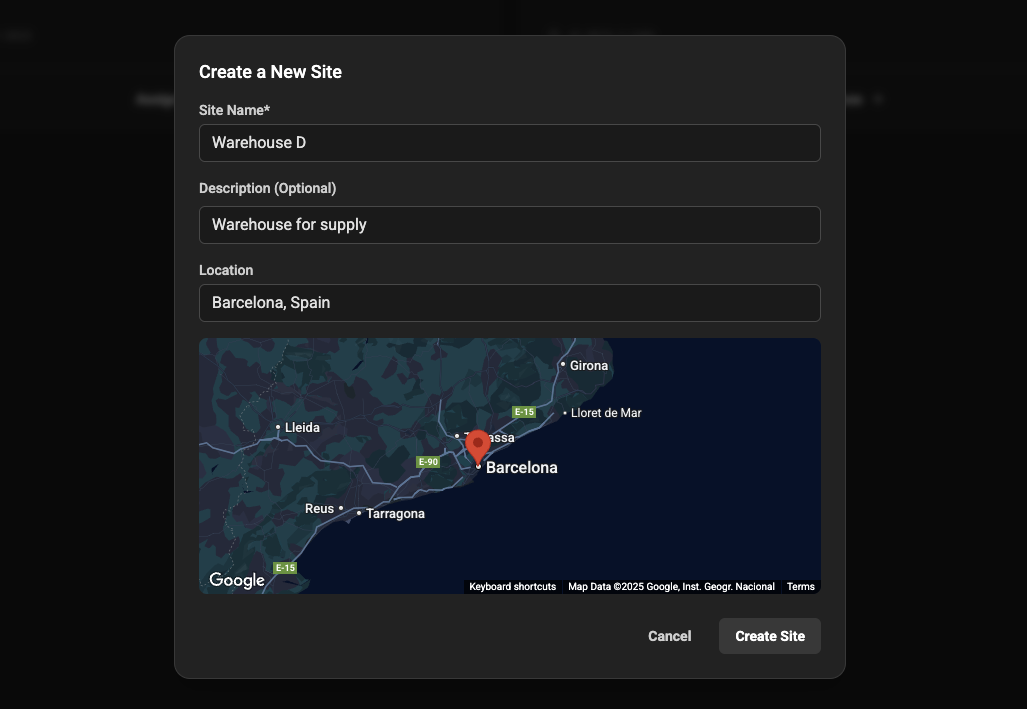
<img src="https://mintcdn.com/insaion/dkLh615XOmGRTVSX/assets/sites/sites-new-form.png?fit=max&auto=format&n=dkLh615XOmGRTVSX&q=85&s=e7aab002287d9f688b2fb112888f6641" alt="Placeholder: Create site form filled example" width="1027" height="709" data-path="assets/sites/sites-new-form.png" />

### After create: quick next steps

* Add devices: create or onboard devices and set their `site` to the newly created site.
* Deploy agents: install and configure agents to connect devices at the site.
* Create monitoring rules: set up alarms for key metrics on devices at the site.

### Troubleshooting

* Q: I submitted the form but no site appears in the list. <br />
  A: Confirm you received a UI success notification. Refresh the list and check filters.

* Q: The site appears but I can't add devices. <br />
  A: Ensure your user role has permission to modify the site (Admin or Operator).

<div className="insaion-footer" role="contentinfo">
  <div className="insaion-footer__card">
    <div className="insaion-footer__content">
      <span className="insaion-footer__icon" aria-hidden="true">
        <svg viewBox="0 0 24 24" width="20" height="20" aria-hidden="true" focusable="false" className="insaion-footer__svg" role="img">
          <path fill="currentColor" d="M21 6.5A3.5 3.5 0 0 0 17.5 3h-11A3.5 3.5 0 0 0 3 6.5v5A3.5 3.5 0 0 0 6.5 15H8v3l3-3h6.5A3.5 3.5 0 0 0 21 11.5v-5zM7 8.5a1 1 0 1 1 0 2 1 1 0 0 1 0-2zm4 0a1 1 0 1 1 0 2 1 1 0 0 1 0-2zm4 0a1 1 0 1 1 0 2 1 1 0 0 1 0-2z" />
        </svg>
      </span>

      <div>
        If something's unclear or you hit a blocker, contact us on

        <a href="https://discord.gg/ZJMPfMmu3S" target="_blank" rel="noopener">
          Discord
        </a>

        or <a href="mailto:contact@insaion.com">[contact@insaion.com](mailto:contact@insaion.com)</a>
      </div>
    </div>
  </div>
</div>
