

Billing & Plans
This page helps you manage your subscription, review usage, and configure what happens when quotas are reached.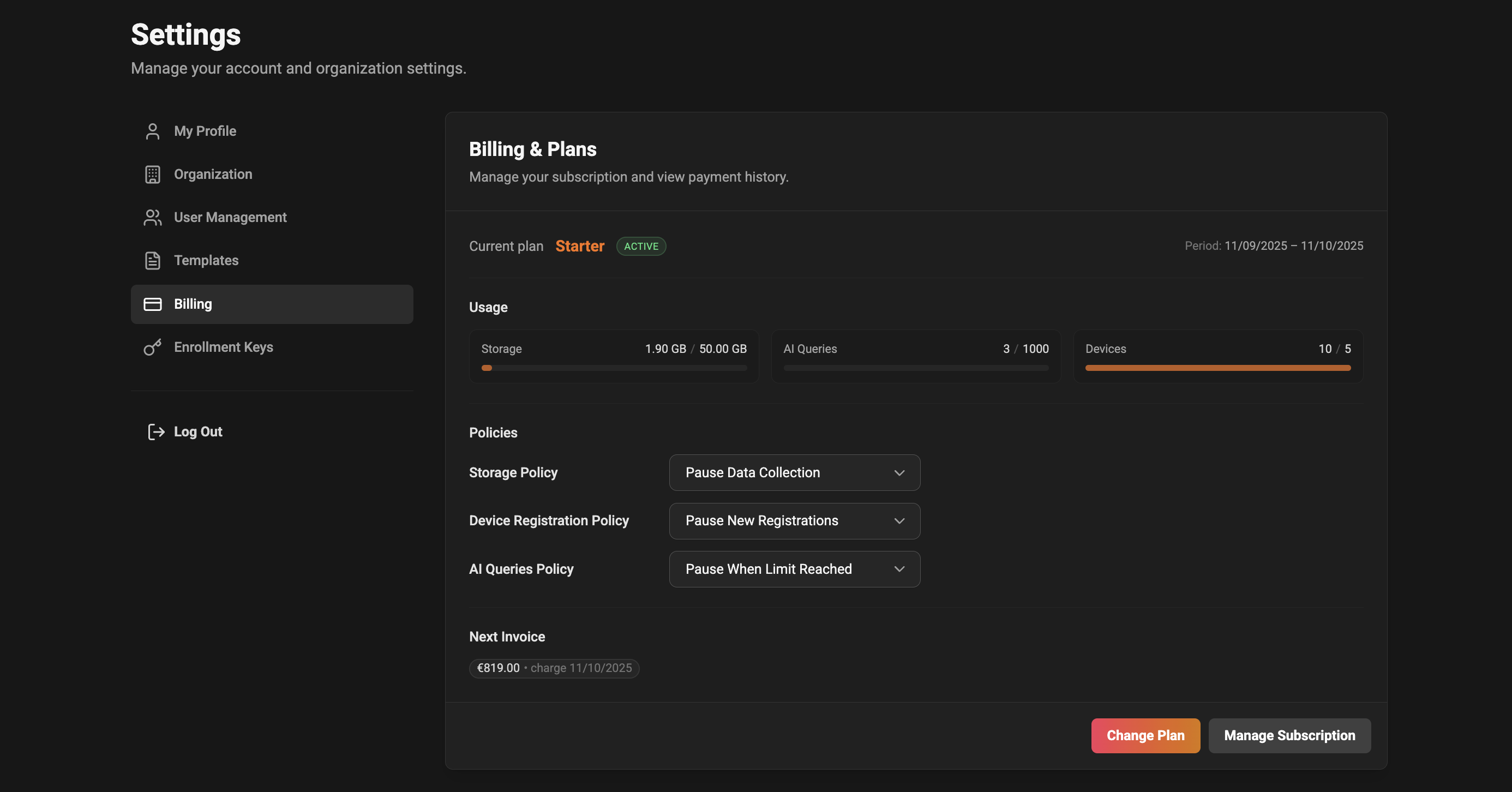
At a glance
- Current plan and status: your active plan and subscription health (Active, Trial, Past Due, etc.).
- Billing period: start and end dates for your current cycle.
- Quick actions: change plan, open billing portal, add/update payment method.
Usage
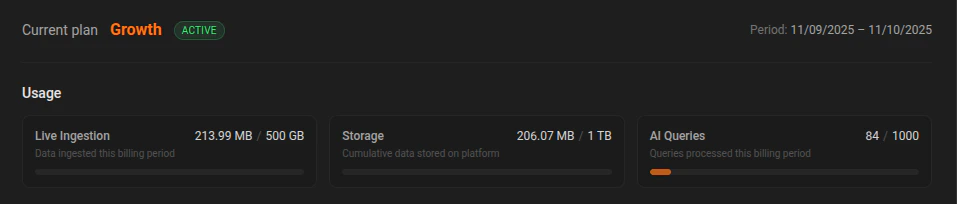
The Usage section shows your data usage for the current cycle:- Live Ingestion (GB): The amount of new data ingested this billing period. This is tracked monthly and resets each cycle.
- Storage (GB): The total amount of data you are currently storing on the platform.
- AI Credits: Shows the credits consumed in the current billing period against the allowance included with your plan. Each completed AI provider step consumes credits based on its raw input and output tokens.
- The bar fills proportionally to usage. If usage goes beyond included quota, overage may apply (paid plans only, when overages are enabled).
- Values are updated periodically; check back if you see a sudden jump—some usage updates may take a moment to appear.
Policies
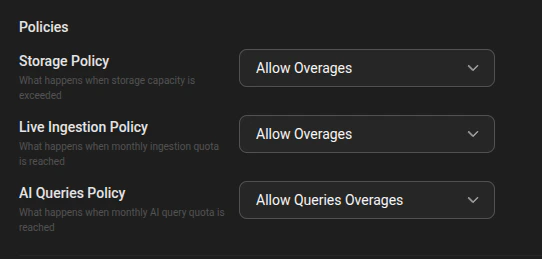
Policies control what happens when limits are reached.-
Live Ingestion Policy
- Pause Data Collection: stop ingesting new live data when the monthly live-ingestion quota is reached.
- Allow Ingestion Overages: continue ingesting and bill overage usage (paid plans only).
-
AI Credits Policy
- Pause When Credits Are Used: stop Copilot once current-period usage reaches the plan allowance.
- Allow Overages: continue processing and bill credits beyond the plan allowance (paid plans only).
- Free plan always uses hard limits for live ingestion and AI credits (no overages).
- Pause options are conservative and prevent extra charges.
- Allow overages keep your service uninterrupted but may result in additional charges.
How data billing works
Billing is based on data usage and AI credits:- Live ingestion (monthly): Tracked as ingested GB within the billing month and reset each month.
- Storage (current): Tracked as total stored GB on the platform.
- AI credits: Added to current-period usage after each completed provider step based on raw input and output tokens. Once usage reaches the plan allowance, Copilot pauses unless AI credit overages are enabled.
Next Invoice and Charges
The Next Invoice area shows the amount you will be charged at the next billing date. When available, you can open an invoice breakdown to see line items, discounts, taxes, and the due date.- If the system is still calculating estimated usage, you may see a “calculating…” message for a short time.
- Click the invoice amount to expand a detailed breakdown of upcoming charges.
Actions you can take
- Change Plan: opens the in-app flow to switch plans. Scheduled changes (if chosen) will be applied at the selected future date.
- Manage Subscription / Add payment details: opens the billing portal where you can update payment methods, view invoices, and manage subscriptions.
- Update Policies: from the page you can change how storage and live ingestion behave when you hit limits.
- Choose “Pause” policy if you want to avoid unexpected charges.
- Choose “Allow overages” if continuity of service is more important than avoiding extra billing.
Status badges explained
- Active / Trial: subscription is active or in trial; if a trial doesn’t have a payment method, the page will remind you to add one.
- Past Due / Unpaid: there may be an issue with your payment method—open the billing portal to update payment details.
- Cancelled: the subscription is cancelled or will not renew at the end of the period.
Common questions
-
Q: Why is the Allow Overages option disabled?
- A: The Free plan disables overages to prevent accidental billing. Upgrade to a paid plan to enable overages.
-
Q: Do we overwrite old data when limits are reached?
- A: No. Overwrite-oldest behavior is no longer used.
-
Q: I changed a policy but it doesn’t look applied yet—what do I do?
- A: Policy changes are applied immediately, but some usage displays might take a minute to refresh. Try refreshing the page or wait a short while.
-
Q: Where can I see past invoices?
- A: Use the Manage Subscription link to open the billing portal which contains your invoice history and payment receipts.
Troubleshooting
- If your billing portal link doesn’t open: check your internet connection and try again. If the problem persists, contact support with a screenshot of the error banner.
- If the usage shown looks incorrect: wait a few minutes and refresh—usage metrics are periodically updated. If numbers remain off, contact support and include the date range and the metric that looks wrong.
Where to get help
If you still need assistance, open a support request from the app or contact your account manager. Include a screenshot of the page and the approximate time when you saw the issue to help us investigate faster.Quick tips
- Keep conservative pause policies enabled if you need strict spend control.
- Use the invoice breakdown to spot one-off charges or prorations when you change plans mid-period.